
Tuesday, January 25, 2011

Friday, January 14, 2011
Reading Comprehension Challenge
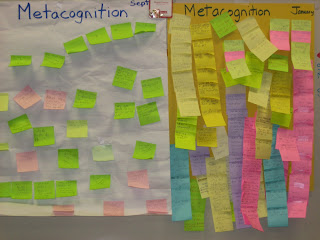
In fourth grade we work on metacognition (thinking about our own thinking). In reading students record what they think about while they read. Examples could be questions they have, inferences like predictions or conclusions, connections that they make with the book, or thoughts about checking yourself for understanding. Last September, the class was able to come up with 31 sticky note thoughts, but this week in January they were able to produce 116 thoughts about what they were reading in 15 minutes. Here is a picture comparing September to January.


Wednesday, December 1, 2010
Student School E-mail
Students have an e-mail account here at school. The account is to be used for school purposes only to communicate with each other about school work and to send computer work to their account that can be accessed at home. We have practiced this at school so the kids should be familar with it. Below are directions to get onto the account from school or home.
Steps for accessing your E-mail account at school and home
1) Get onto the internet
3) Type in your student username (lwsd\s-dbaxter)
4) Type in your password
5) Click on “New Mail” box in the top left corner
6) In the “To” field, type your own username followed by @lwsd.org (i.e. s-dbaxter@lwsd.org)
7) In the “subject” field, type a title for your e-mail (i.e. wolf research)
8) Type a message in the big white field
9) To send your work home, click on the “attachments” button.
10) Click on “Browse”. This will allow you to find your document inside your computer. Use the drop arrow in the “look in” field to find it. It will most likely be inside “My computer” then inside the file with your name. Double click on the document you want to attach to your e-mail.
11) Now you’re all ready. Click on “SEND” and it is on it’s way to the same web page and to your e-mail in box.
12) At home, go through the exact same procedure. The web page address will take you to the exact same location. When you see an e-mail in your “In Box”, click on it to open. Then click on the attached file to open it. You can then work on your document at home save it on your home computer then e-mail it back to school the same way.
Subscribe to:
Posts (Atom)